API keys provide a secure way for external services and automation tools to authenticate with the InProd API without requiring interactive user login. Unlike session tokens obtained through username and password authentication, API keys are long-lived, do not expire due to inactivity, and are designed for programmatic access.
¶ Overview
Each API key:
- Is generated with a cryptographically secure random token.
- Is shown only once at the time of creation and cannot be retrieved afterwards.
- Has a human-readable name for easy identification.
- Records who created it and when.
- Supports fine-grained permissions scoped to specific environments or applied globally.
- Can optionally restrict access to specific IP addresses or CIDR ranges.
- Can be instantly revoked by deleting it.
API keys cannot be used to access administrative endpoints such as user management, group management, or environment configuration. They are intended exclusively for operational API access such as changesets, change history, change sync, and CICD operations.
¶ Managing API Keys in the UI
API keys are managed from the InProd web interface under Admin > API Keys.
¶ Creating an API Key

- Navigate to Admin > API Keys.
- Click the create button to open the new API key form.
- Enter a Name for the key (e.g., "CI/CD Pipeline", "Terraform Provider", "Monitoring Service").
- Optionally provide an IP Whitelist — a list of IP addresses or CIDR ranges that are allowed to use this key. Leave empty to allow access from any IP address.
- Submit the form.
- The newly created API key token is displayed. Copy this token immediately — it will not be shown again. After you close the dialog, only a masked version (e.g.,
a1b2c3d4************************) is displayed.
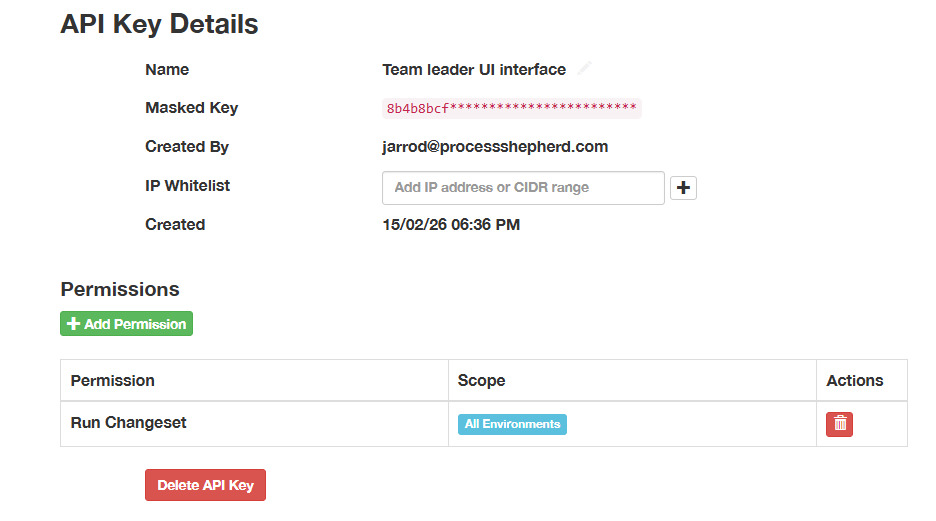
¶ Adding Permissions
Permissions are added to the key after it has been created. See the Permissions section for details on how permissions work and which permissions are available.
¶ Updating an API Key
The key name and IP whitelist can be updated at any time. The token itself cannot be changed — if a new token is needed, delete the existing key and create a new one.
¶ Authenticating with an API Key
To authenticate API requests, include the API key in the Authorization header using the Api-Key keyword:
Authorization: Api-Key <your-api-key-token>
¶ Example using curl
curl -H "Authorization: Api-Key a1b2c3d4e5f6...your-full-token-here" \
     https://app.example.com/api/v1/bison/object/1/Change/
¶ Example using Python
import requests

headers = {
    "Authorization": "Api-Key a1b2c3d4e5f6...your-full-token-here"
}

response = requests.get(
    "https://your-company.inprod.io/api/v1/bison/object/1/Change/",
    headers=headers
)
Note: The
Api-Keykeyword is distinct from theTokenkeyword used for interactive session authentication. Do not useTokenwith an API key or vice versa.
¶ Permissions
API key permissions control which environments and operations the key can access. Permissions use the same permission model as user and group permissions, and can be assigned at two levels:
¶ Global Permissions
A global permission applies to all environments. For example, assigning view_changeset globally allows the API key to view changesets in every environment.
¶ Environment-Scoped Permissions
An environment-scoped permission applies to a single, specific environment. For example, assigning run_changeset to "Production" allows the API key to execute changesets only in that environment.
This allows fine-grained control — a key could have read access to all environments but write access only to a development environment.
¶ Available Permissions
The following permissions can be assigned to API keys:
| Permission | Description |
|---|---|
view_environment |
View environment data, objects, and audit history |
view_changeset |
View changesets and their contents |
add_changeset |
Create new changesets |
change_changeset |
Edit existing changesets |
delete_changeset |
Delete changesets |
run_changeset |
Execute changesets |
unpublish_changeset |
Unpublish a published changeset |
revert_environment |
Revert changes from audit history |
¶ IP Whitelisting
Each API key can optionally be restricted to specific IP addresses or network ranges. When an IP whitelist is configured, only requests originating from the listed addresses are accepted.
¶ Supported Formats
- Individual IPv4 address:
192.168.1.100 - IPv4 CIDR range:
10.0.0.0/8 - Individual IPv6 address:
2001:db8::1 - IPv6 CIDR range:
2001:db8::/32
Multiple entries can be specified. If the whitelist is empty (the default), requests are accepted from any IP address.
When a request arrives from an IP address not in the whitelist, authentication is rejected with the message: "Request IP address is not in the API key whitelist."
¶ Audit History
All actions performed using an API key are recorded in the audit history, exactly as they are for regular user actions. Each API key has a dedicated service account (with a username in the format svc_apikey_<prefix>) that is recorded as the user in all audit entries.
This means:
- Changeset execution — When an API key executes a changeset, the run history and any resulting object changes reference the API key's service account.
- Change reverts — Reverts performed via an API key are attributed to the service account.
- Environment history — Data imports and object state changes triggered via an API key are logged under the service account.
- Object changes — Individual field-level changes recorded in the audit trail include the service account username.
This provides full traceability of every action performed by each API key. The service account username includes the key's prefix (e.g., svc_apikey_a1b2c3d4), making it straightforward to identify which API key performed a given action in the audit history.
¶ Revoking an API Key
To revoke an API key, delete it from Admin > API Keys in the UI. Revocation is immediate — any subsequent request using the deleted key will receive a 401 Unauthorized response.
When an API key is deleted, its associated service account is also removed. Any audit history entries that reference the service account are preserved for compliance purposes.
¶ Changeset Parameters
The changeset API endpoints accept parameters that allow callers to override variable values and target environments at execution time. This makes it possible to build automation workflows and custom interfaces that reuse the same changeset definitions with different inputs.
¶ Overriding Variables
Changesets can define variables — named placeholders that are substituted into action parameters at execution time. Variables can be scoped to a specific environment or defined globally (applying to all environments).
When calling the execute or validate endpoints for a stored changeset, you can override any of these variables by passing a flat dictionary of key-value pairs in the request body. The variable names in the dictionary are matched against the changeset's defined variables, and the provided values replace the stored values for that execution.
curl -X PUT \
  -H "Authorization: Api-Key a1b2c3d4e5f6...your-full-token-here" \
  -H "Content-Type: application/json" \
  -d '{"queue_name": "Sales_Queue", "timeout": "30"}' \
  https://your-company.inprod.io/api/v1/change-set/42/execute/
This overrides the queue_name and timeout variables for this execution only — the stored variable definitions on the changeset are not modified. Variables defined as global (applying to all environments) can also be overridden in the same way.
If a variable name in the request body does not match an existing variable on the changeset, it is added as a new variable scoped to the changeset's environment for that execution.
This is useful for:
- Automation pipelines that execute the same changeset with different parameter values per run.
- Custom UI interfaces that allow users to provide input values before executing a changeset.
- Scheduled tasks that pass dynamic values such as dates, counts, or environment-specific identifiers.
¶ Overriding the Target Environment
When executing or validating a changeset from a JSON or YAML payload (using the execute_json, execute_yaml, validate_json, or validate_yaml endpoints), the target environment can be overridden using the environment query parameter. This takes precedence over the environment field defined in the payload data.
The environment parameter accepts either the environment ID (integer) or the environment name (case insensitive).
# Using environment ID
curl -X POST \
  -H "Authorization: Api-Key a1b2c3d4e5f6...your-full-token-here" \
  -H "Content-Type: application/json" \
  -d @changeset.json \
  "https://your-company.inprod.io/api/v1/change-set/execute_json/?environment=3"

# Using environment name (case insensitive)
curl -X POST \
  -H "Authorization: Api-Key a1b2c3d4e5f6...your-full-token-here" \
  -H "Content-Type: application/json" \
  -d @changeset.json \
  "https://your-company.inprod.io/api/v1/change-set/execute_json/?environment=Production"
In the first example, the changeset is executed against environment ID 3. In the second, it is executed against the environment named "Production". In both cases the value in the JSON data is overridden.
The same applies to the environment field within the JSON or YAML payload — it also accepts either an ID or a name.
This is useful for CI/CD workflows where the same changeset definition is promoted through environments — for example, deploying to development, staging, and production using a single changeset file with only the environment parameter changing between stages.
¶ Polling for Task Status
All changeset execute and validate operations run as background tasks when called via API key authentication. The API response includes a task_id that can be used to poll for the task's status.
The validation response uses the following format:
{
    "data": {
        "type": "change-set-validation",
        "attributes": {
            "title": "Validation queued",
            "description": "Changeset validation is running as a background task.",
            "task_id": "a1b2c3d4-e5f6-7890-abcd-ef1234567890"
        }
    }
}
Use the task_id to poll for completion, or provide a callback_url to receive the results via webhook.
The execute response includes a task_id and successful is null:
{
    "data": {
        "type": "change-set-confirmation",
        "attributes": {
            "title": "Processing...",
            "description": "Your change set is being run in the background.",
            "run_id": 24,
            "successful": null,
            "task_id": "a1b2c3d4-e5f6-7890-abcd-ef1234567890"
        }
    }
}
When using API key authentication, task_id is always present because the operation always runs as a background task.
¶ Checking Task Status
Use the task status endpoint to poll for completion:
curl -H "Authorization: Api-Key a1b2c3d4e5f6...your-full-token-here" \
  https://your-company.inprod.io/api/v1/task-status/a1b2c3d4-e5f6-7890-abcd-ef1234567890/
| Status | Meaning |
|---|---|
PENDING |
Task is queued but has not started |
STARTED |
Task is currently running |
SUCCESS |
Task completed successfully (response includes result) |
FAILURE |
Task failed (response includes error) |
RETRY |
Task is being retried |
REVOKED |
Task was cancelled |
¶ Retrieving Results
When a task completes with SUCCESS, the response includes a result field containing the full outcome of the operation. The structure of result depends on whether the task was a validation or an execution.
¶ Validation result
{
    "task_id": "a1b2c3d4-e5f6-7890-abcd-ef1234567890",
    "status": "SUCCESS",
    "result": {
        "is_valid": false,
        "validation_results": [
            {
                "action_id": 534,
                "errors": {
                    "folderDbid": [{"iteration": null, "msg": ["No object found with query"]}]
                },
                "warnings": {}
            }
        ],
        "changeset_name": "Deploy Queue Config",
        "environment": {"id": 3, "name": "Production"}
    }
}
The is_valid field is true when no validation errors were found and validation_results is an empty array. When is_valid is false, the validation_results array contains the details of each validation error and warning, grouped by action.
¶ Execution result
{
    "task_id": "a1b2c3d4-e5f6-7890-abcd-ef1234567890",
    "status": "SUCCESS",
    "result": {
        "run_id": 24,
        "successful": true,
        "changeset_name": "Deploy Queue Config",
        "environment": {"id": 3, "name": "Production"}
    }
}
The successful field is true when all actions completed without errors, and false when one or more actions failed. The run_id can be used to retrieve the full run report via the run history endpoint.
¶ Failed tasks
When a task fails, the response includes an error field instead of result:
{
    "task_id": "a1b2c3d4-e5f6-7890-abcd-ef1234567890",
    "status": "FAILURE",
    "error": "Description of what went wrong"
}
¶ Result Expiry
Task results are stored for 1 hour after the task completes. After this period the result is automatically removed and polling the task status endpoint will return PENDING, which is indistinguishable from a task that has not yet started. Polling scripts should retrieve the result promptly after the task completes.
¶ Callback URL
Instead of polling for task status, you can provide a callback_url query parameter on any execute or validate endpoint. When the operation completes, InProd sends an HTTP POST to the specified URL with the results. This eliminates the need to poll the task status endpoint and allows event-driven automation workflows.
All execute and validate endpoints support the callback_url parameter and it is the recommended way to receive results without polling.
¶ Usage
Append callback_url as a query parameter to any supported endpoint. The parameter can be combined with other query parameters such as environment.
¶ Execute with callback
curl -X PUT \
  -H "Authorization: Api-Key a1b2c3d4e5f6...your-full-token-here" \
  -H "Content-Type: application/json" \
  -d '{"queue_name": "Sales_Queue"}' \
  "https://your-company.inprod.io/api/v1/change-set/42/execute/?callback_url=https://your-server.com/webhook/inprod"
¶ Validate a stored changeset with callback
curl -X PUT \
  -H "Authorization: Api-Key a1b2c3d4e5f6...your-full-token-here" \
  -H "Content-Type: application/json" \
  -d '{}' \
  "https://your-company.inprod.io/api/v1/change-set/42/validate/?callback_url=https://your-server.com/webhook/inprod"
¶ Validate a JSON payload with callback and environment override
curl -X POST \
  -H "Authorization: Api-Key a1b2c3d4e5f6...your-full-token-here" \
  -H "Content-Type: application/json" \
  -d @changeset.json \
  "https://your-company.inprod.io/api/v1/change-set/validate_json/?environment=Production&callback_url=https://your-server.com/webhook/inprod"
The API response is returned immediately. When the operation completes (which may be later for background tasks), InProd sends an HTTP POST to the callback URL with the results.
¶ Callback Payloads
¶ Execute callback
Sent when a changeset execution completes, either successfully or with errors.
{
    "event": "changeset.executed",
    "data": {
        "run_id": 24,
        "successful": true,
        "task_id": null,
        "title": "Success",
        "description": "Changeset execution completed.",
        "changeset_name": "Deploy Queue Config",
        "environment": {
            "id": 3,
            "name": "Production"
        }
    }
}
The successful field is true when all actions completed without errors, and false when one or more actions failed. The run_id can be used to retrieve the full run report via the run history endpoint.
¶ Validate callback
Sent when changeset validation completes.
{
    "event": "changeset.validated",
    "data": {
        "is_valid": true,
        "validation_results": [],
        "changeset_name": "Deploy Queue Config",
        "environment": {
            "id": 3,
            "name": "Production"
        }
    }
}
The is_valid field is true when no validation errors were found. When is_valid is false, the validation_results array contains the details of each validation error and warning, grouped by action.
¶ Verifying Callback Authenticity
When authenticated with an API key, InProd signs every callback payload using HMAC-SHA256 with the API key token as the shared secret. Two headers are included with the callback request:
| Header | Description |
|---|---|
X-InProd-Signature |
HMAC-SHA256 signature in the format sha256=<hex_digest> |
X-InProd-Timestamp |
Unix timestamp (seconds since epoch) of when the callback was sent |
The signature is computed over the string {timestamp}:{body} where timestamp is the value of the X-InProd-Timestamp header and body is the raw JSON request body.
To verify the signature on your receiving server:
- Extract the
X-InProd-TimestampandX-InProd-Signatureheaders from the incoming request. - Read the raw request body as a string.
- Construct the message string:
{timestamp}:{raw_body}. - Compute the HMAC-SHA256 of the message using your API key token as the key.
- Compare your computed signature with the value in
X-InProd-Signature(after removing thesha256=prefix).
¶ Python verification example
import hmac
import hashlib

def verify_inprod_callback(api_key_token, timestamp, body, signature):
    """Verify the HMAC-SHA256 signature of an InProd callback.

    Args:
        api_key_token: Your API key token (the shared secret).
        timestamp: Value of the X-InProd-Timestamp header.
        body: Raw request body string.
        signature: Value of the X-InProd-Signature header.

    Returns:
        True if the signature is valid.
    """
    message = "{}:{}".format(timestamp, body)
    expected = hmac.new(
        api_key_token.encode('utf-8'),
        message.encode('utf-8'),
        hashlib.sha256
    ).hexdigest()
    return hmac.compare_digest(expected, signature.removeprefix('sha256='))
¶ Delivery and Retry Behaviour
InProd attempts to deliver each callback up to 4 times (1 initial attempt + 3 retries). The retry delays are 10, 30, and 60 seconds between attempts. Each delivery attempt uses a 10-second connection timeout.
A delivery is considered successful when the callback URL responds with any 2xx status code. Any other status code or connection error triggers a retry.
If all delivery attempts fail, a Webhook Failure event is recorded in the environment's audit history. The log entry includes the callback URL and the error message from the final attempt. This is visible under the environment history within InProd.
Callback delivery failures do not affect the changeset execution or validation result — the operation itself completes regardless of whether the callback was delivered successfully.
¶ Accessible API Endpoints
The following is an incomplete list of API endpoints that the API keys can access. All endpoints listed below are subject to the permissions assigned to the API key.
All administrative endpoints under /api/v1/admin/ are blocked for API key access. This includes user management, group management, environment configuration, authentication endpoints, and OAuth settings.
¶ Changeset API — /api/v1/change-set/
Manage and execute changesets for deploying configuration changes.
| Endpoint | Method | Description |
|---|---|---|
/change-set/ |
GET/POST | List or create changesets |
/change-set/{id}/ |
GET/PUT/PATCH/DELETE | Retrieve, update, or delete a changeset |
/change-set/{id}/export/ |
GET | Export a changeset |
/change-set/{id}/export_yaml/ |
GET | Export a changeset as YAML |
/change-set/{id}/validate/ |
POST | Validate a changeset |
/change-set/validate_json/ |
POST | Validate changeset from JSON payload |
/change-set/validate_yaml/ |
POST | Validate changeset from YAML payload |
/change-set/{id}/execute/ |
POST | Execute a changeset |
/change-set/execute_json/ |
POST | Execute changeset from JSON payload |
/change-set/execute_yaml/ |
POST | Execute changeset from YAML payload |
/change-set/variable/ |
GET/POST | List or create changeset variables |
/change-set/environment-variable/ |
GET/POST | List or create environment variables |
/change-set/run-history/{id}/ |
GET | View execution history for a changeset |
¶ Change History — /api/v1/bison/
Access environment object data and audit history.
| Endpoint | Method | Description |
|---|---|---|
/bison/object/{env_id}/Change/ |
GET | List change history for an environment |
/bison/object/{env_id}/Change/revert/ |
PUT | Revert changes |
/bison/object/{env_id}/Change/export/ |
GET | Export change history |
/bison/object/{env_id}/{object_type}/ |
GET | List objects of a given type in an environment |
¶ Genesys Cloud — /api/v1/genesys-cloud/
Interact with Genesys Cloud environments.
| Endpoint | Method | Description |
|---|---|---|
/genesys-cloud/model-name/ |
GET | List Genesys Cloud model types |
/genesys-cloud/model-field/ |
GET | List model fields |
/genesys-cloud/model-sync-states/{id}/sync/ |
POST | Trigger sync for a model type |
/genesys-cloud/{env_id}/{object_name}/{dbid}/sync/ |
POST | Sync a single Genesys Cloud object |
¶ Change Sync — /api/v1/change-sync/
Manage change synchronization rules.
| Endpoint | Method | Description |
|---|---|---|
/change-sync/change-rule/ |
GET/POST | List or create change sync rules |
/change-sync/change-rule/{id}/ |
GET/PUT/DELETE | Manage a change sync rule |
/change-sync/change-rule/{id}/clone/ |
POST | Clone a change sync rule |
/change-sync/logs/ |
GET | View change sync logs |
¶ Task Status — /api/v1/task-status/
Poll for the status of background tasks.
| Endpoint | Method | Description |
|---|---|---|
/task-status/{task_id}/ |
GET | Check the status of a background task |