¶ Overview
With the License Reporting feature, InProd offers to manage the reporting data efficiently. Instead of using other 3rd-party software or vendor to get the license reporting data, you can now verify the consumption usage directly from InProd.
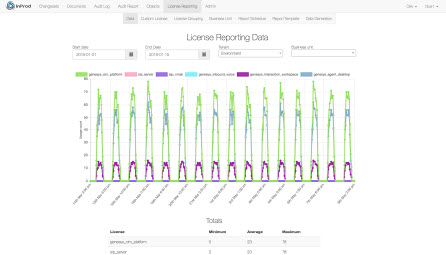
how the license reporting displays the consumption data.
InProd provides the license reporting feature based on the number of agents and not the number of ports. The calculation of the enabled licenses is based on the Genesys configuration at the time in which the data collection process runs. Concurrent license calculations often start with the enabled data as a base and then factor in usage events over the top.
The license reporting feature is configured and reported against a tenant. The only configuration data that is shared across tenants is the Report Template. This enables a clean reporting separation between each tenant.
¶ Menu
The License Reporting menu provides the following sub menus:
Each menu page displays the list of the correcponding items and provides an option to create new one.
- Data: Provides a simple view of the license reporting data that has been collected.
- Custom License: Creates custom licenses.
- License Grouping: Defines and edits which objects need to be included or excluded with any license.
- Business Unit: Business units that can be used to group license consumption according to business units. Groups help to generate consumption reports according to business units.
- Report Schedule: Create schedules to decide when and how reports should be delivered.
- Report Template: HTML templates to use with report schedules for delivery to the end-users.
- Data Generation: The data collection that generates raw license reporting data.

License Reporting Menu
¶ Features
InProd provides the following features:
- Enabled and concurrent license models
- Support for custom license definitions, not limited to Genesys products
- Business unit level reporting
- Intra day reports, 2 minutes behind real time
- Customizable report templates
- Report delivery available in HTML, Excel, and CSV
- License definitions that are consistent with LRM
- Multi-site support
¶ Architecture
The InProd license reporting feature does not utilize Genesys Infomart for data collection. A direct connection to the Genesys Configuration Server is achieved via the existing inprod-aft component. For real time event data, a new component has been developed called the InProd Stat Server Connector (inprod-ssc).
inprod-ssc is an optional component that monitors agent’s events and periodically posts this data to inprod-bow in order to report on concurrent license types. This component can connect to a single Stat Servers or multiple if needed. Agents are discovered by their association with an agent group. For this reason, a list of agent groups to monitor must be supplied in the application configuration.
If there are agents within the contact center that are not members of any of the supplied agent groups they will be excluded from the reporting data. Duplicate memberships are expected and handled accordingly.
The statics used by inprod-ssc are custom defined and do not need to be configured directly on the Stat Server. The load generated on any Stat Server is minimal, only the login and log out events are monitored.
Like Aft, it is only necessary to have a single binary instance on the host file system.
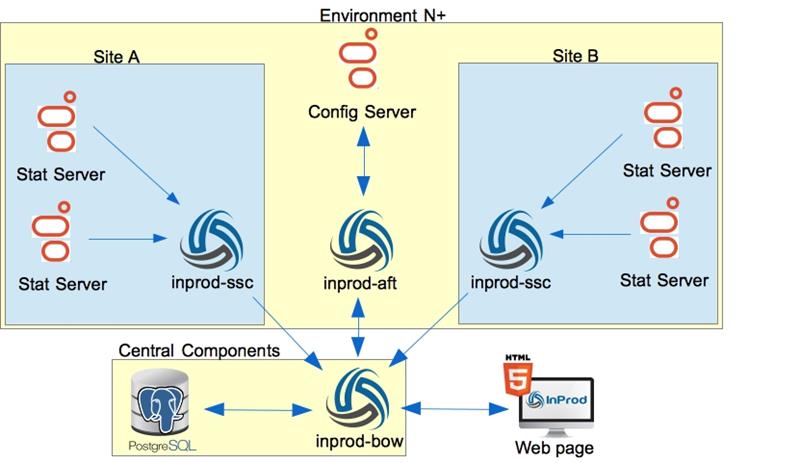
This design allows InProd to support complicated architectures including multisite deployments. Like inprod-aft, inprod-ssc has been designed to behave like a traditional Genesys server component leveraging the Genesys management layer and Genesys High Availability functionality
¶ Process Flow
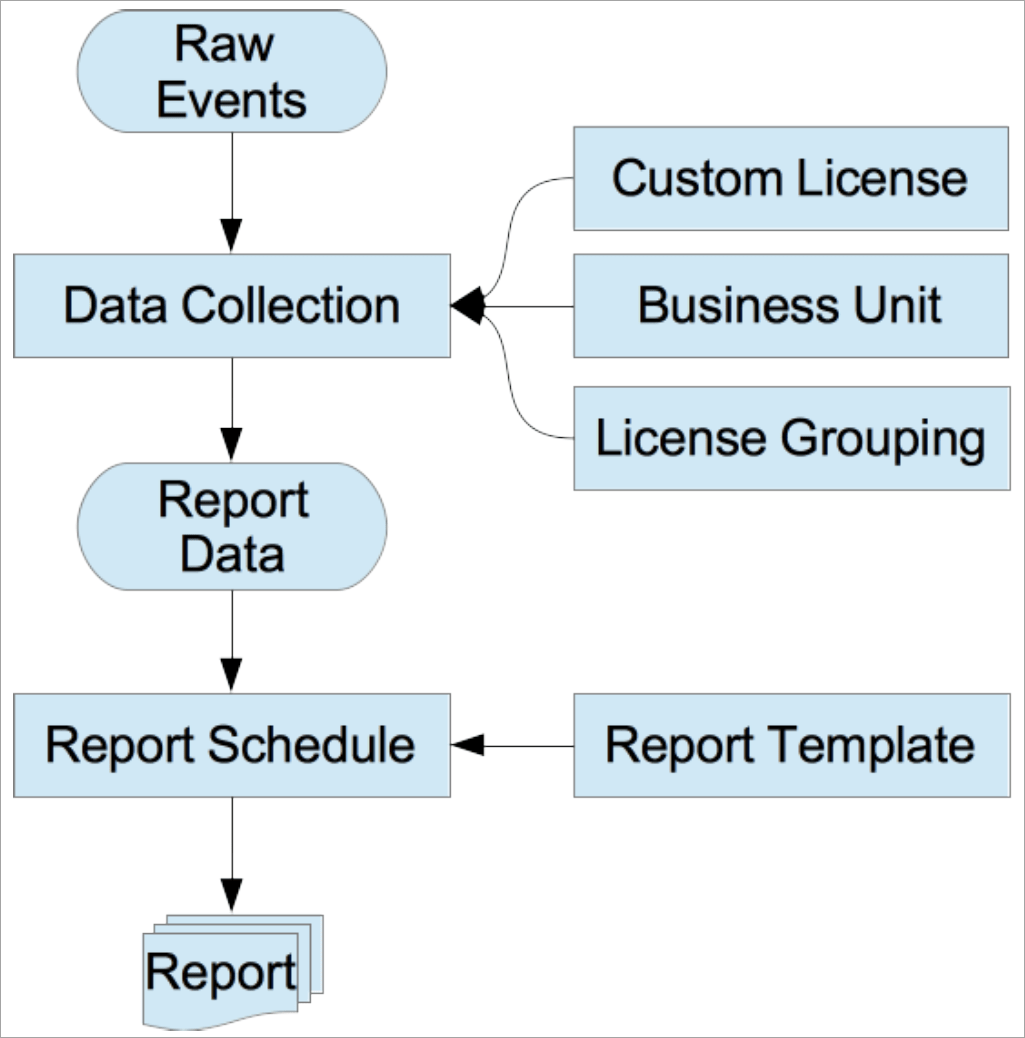
Process Flow
The Raw Data Events collected from InProd SSC are stored inside the Raw Events database tables.
The Data Collection defines a periodical task that collects the Raw Events data and Genesys configuration to generate the Report Data. Data Collection process will generate Custom License consumption and split data into the defined Business Units for the associated tenant. With the use of License Grouping, you can tweak the system-defined Genesys licenses or Custom Licenses, forcing objects to be qualified or disqualified from usage.
The Report Data is a table in InProd. This table contains the license usage data for each environment and tenant for the period of time, which is defined in the Data Collection configuration. This data can be directly accessed from the table in the PostgreSQL database.
The Report Schedule generates the distributed reports, which contain a CRON style trigger as to when the report should be generated. When generating the HTML reports, the Report Template defines the HTML that will be used to render the report.
The final Reports that the License Reporting feature generates are self-contained data sets. These reports do not refer back to the central data set. When reports are generated as HTML, the reporting data is contained as JavaScript variables in the document. HTML reports can be shared externally or archived for accounting records.
¶ Custom License
You can define the Custom licenses to report the consumption of the third party products or custom developed features based on agents.
The Custom License index page can be accessed by selecting the associated link in the navigation bar. From here all of the Custom Licenses that have been defined within the current environment are displayed.
You can create a new Custom License by clicking the New button, which opens the Create New dialog box.
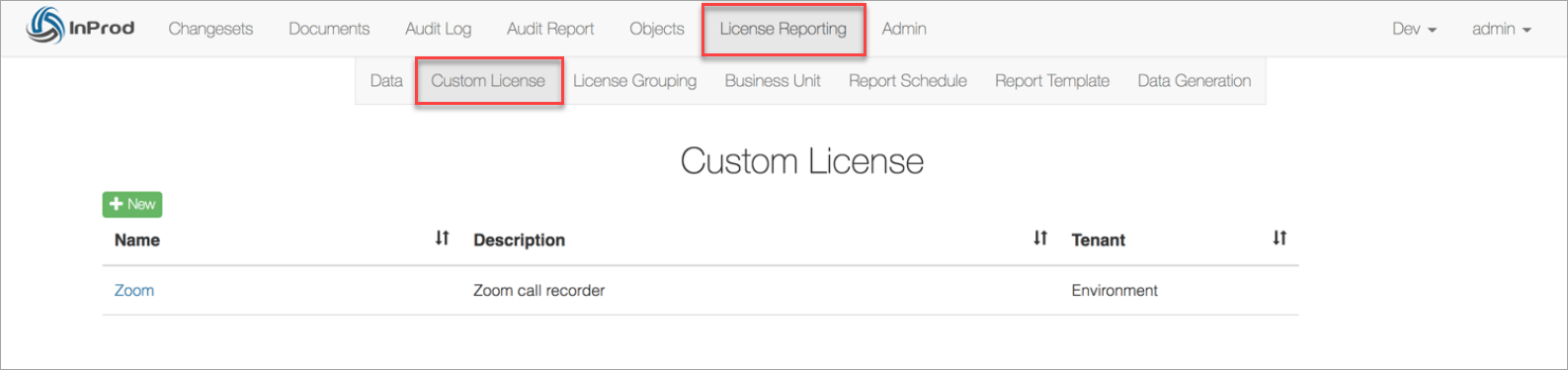
Custom License Index page
You can change the name and description once the object has been created. The tenant field is read-only. The Entries table defines what resource objects will qualify for this license. The license calculation type of enabled or concurrent is defined within the Data Generation sub menu.
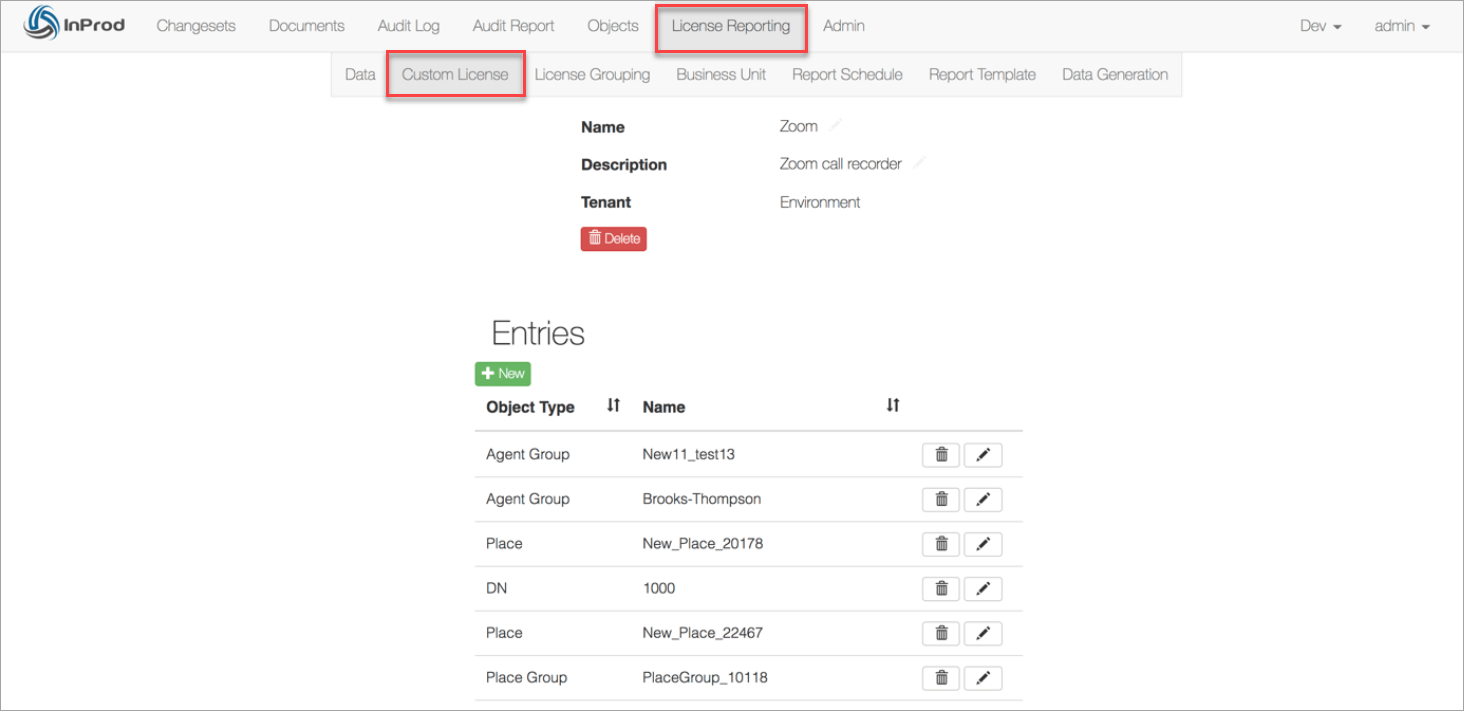
Custom License Details page
¶ License Grouping
License Grouping allows you to modify the license definitions so that you can include or exclude a device from qualifying for usage. The main use case is to prevent the predefined Genesys licenses from including resources that are not desired to appear within the usage data. License Grouping can also be applied to Custom Licenses to exclude devices in the same manner.
The Tenant value cannot be edited after the License Grouping object has been created. All other fields are editable.
The Entries table is used to define the devices that are to be included within this License Grouping. If an agent or DN object is qualified by more than one resource configured within the Entry table, the usage data does not count the object double.
Objects that then qualify will be either forced into or out of the licenses that are defined within the Applied Licenses table. It is typical for only one license to be defined with the Applied Licenses table.
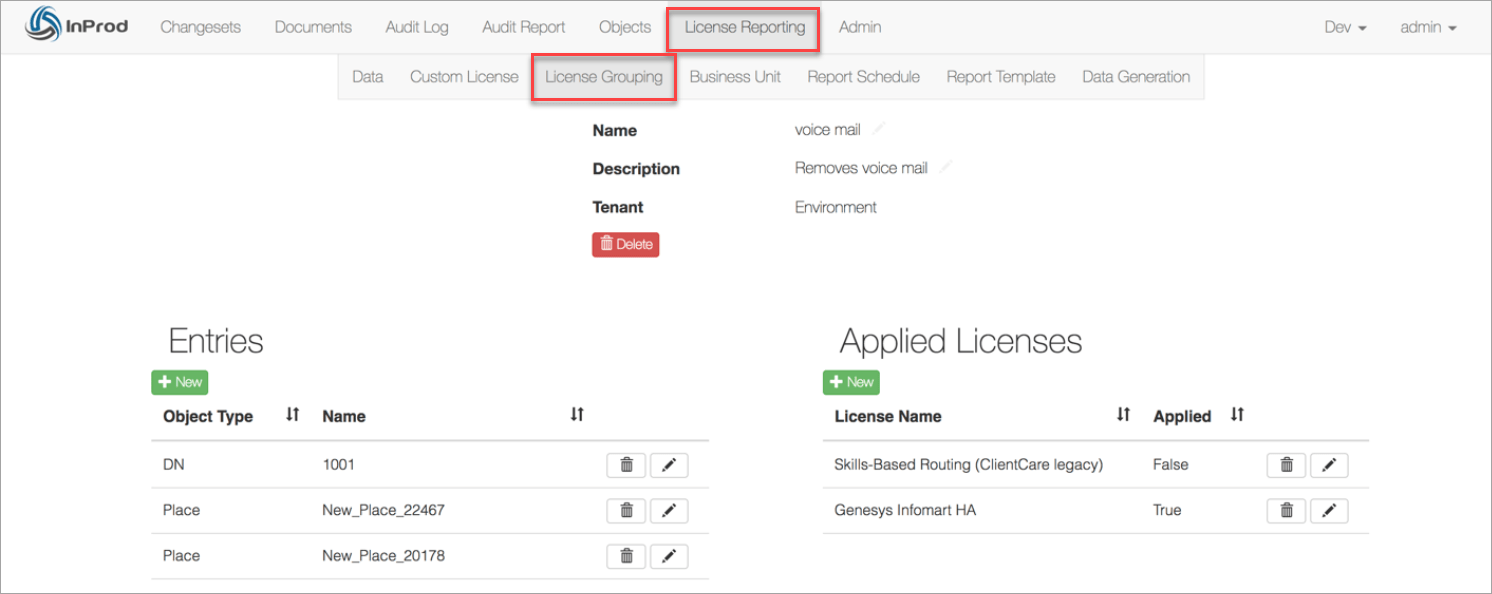
License Grouping Details page
¶ Business Unit
Often in an organization, there are multiple business units that are consumers of the contact center platform. With the use of Business Units, the platform consumption can be correctly allocated to each consumer based on their actual usage.
For situations where an agent belongs to multiple business units, the usage is evenly distributed across each configured business unit. For example, if an agent qualifies within 3 Business Units, the usage reported will contain 1/3 of the license for each Business Unit. As a result, the Business Unit usage reports do not always contain whole numbers.
If every agent within the contact center is defined within one or more Business Units then it will be possible to verify the Business Units usage data against the total usage data. However, if there are one or more agents that are not included within a Business Unit then the totals will be unequal.
The Tenant value cannot be edited after the License Grouping object has been created. All other fields are editable.
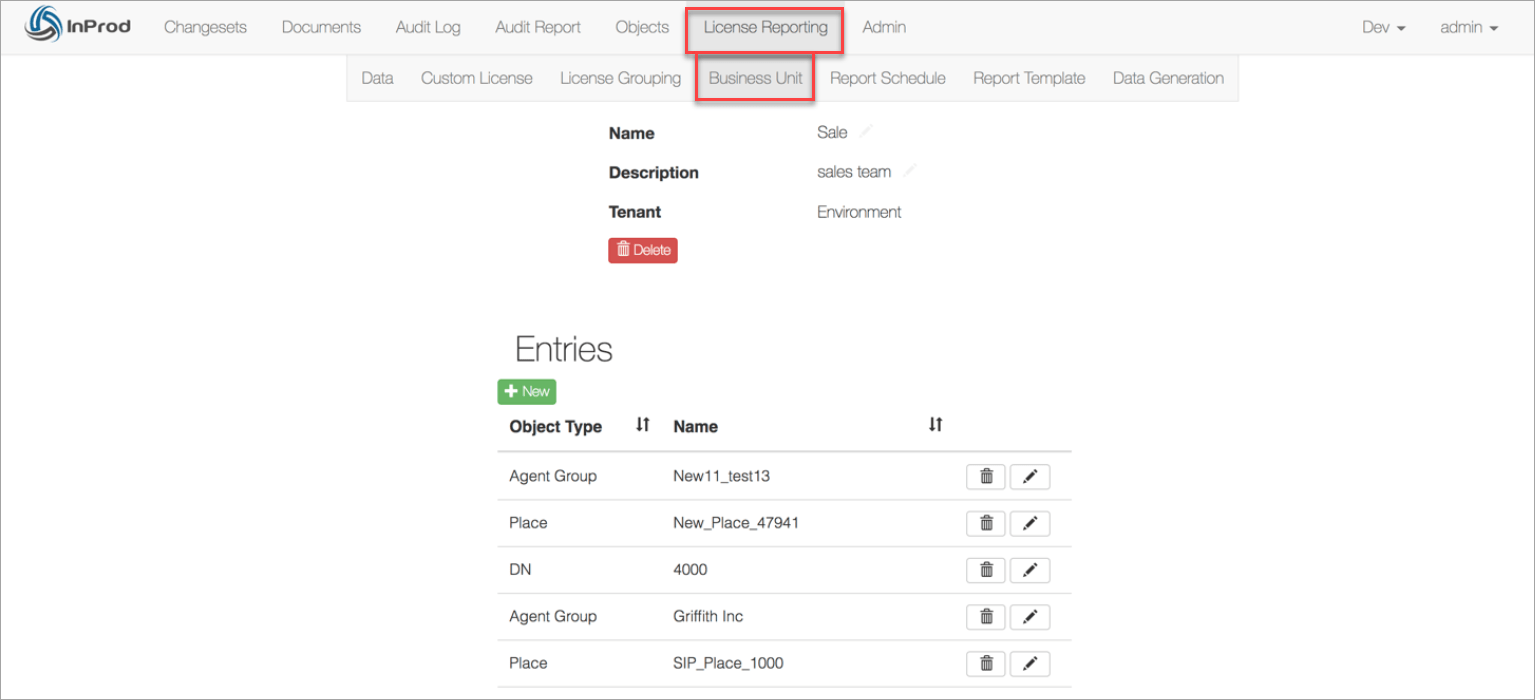
Business Unit detail page
¶ Report Schedule
The Report Schedule determines when and how a report is to be delivered. It does not generate the usage data but it only provides access to the data via a report.
You can configure multiple Report Schedules to deliver different reports for the same tenant object. Alternatively, if the license usage data is being accessed directly via the PostgreSQL database, you do not need to define the Report Schedule.
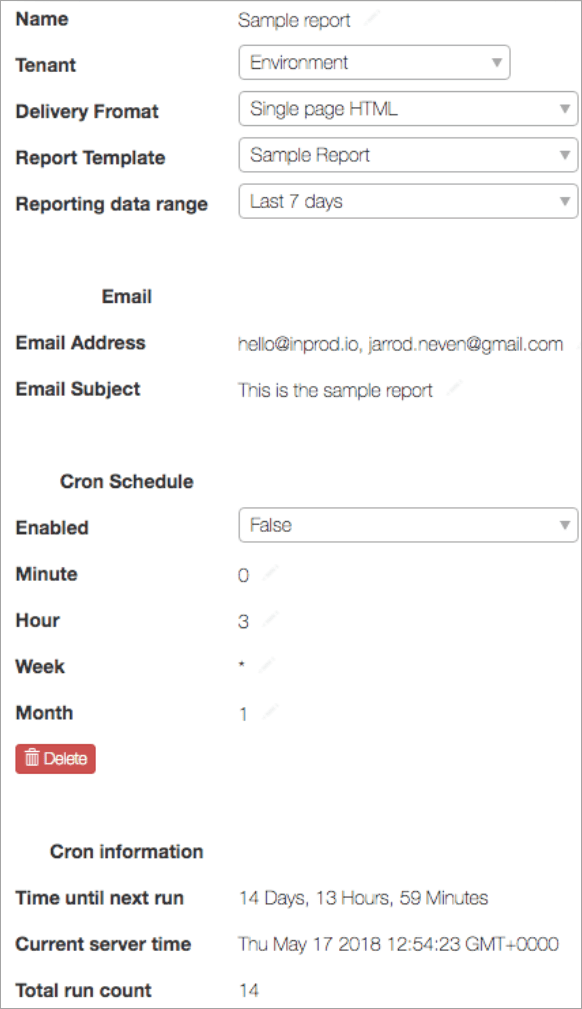
| Name | The name used to identify the schedule and its purpose. |
| Tenant | The tenant from which the Report Data will be collected. |
| Delivery Format | The format in which the report will be delivered. |
| Report Template | Only valid for Delivery Format of HTML. |
| Reporting data range | The date range to be considered for including Reporting Data. |
| Mail Address | A list of email addresses (separated by comma) to send the report. |
| Email Subject | Text that will appear in the email subject line. |
| Cron Enable | Enable or disable the delivery of this report. |
| Cron Minute | The minute range this will run. |
| Cron Hour | Hour range this will run. |
| Cron Week | Day of week range this will run. |
| Cron Month | Date within the month range. |
The Cron job parameters follow standard POSIX Cron conventions. The value of * is for every available option. It is recommended not to use * on the Minute parameter.
- Minute: 0-59 for a specific time or a list of values such as 0, 15, 30
- Hour: 0-59 for a specific time or a list of values such as 0, 15, 30
- Week: the day of the week 0-6 where 0=Monday, or MON-FRI or a list of values
- Month: the day of the month, 1-31 or a list of values
When creating Cron entries. it is important to consider the time of the server as this may be in a different time zone than the user.
¶ Report Template
Report Templates are required for reports that are scheduled with the ‘Delivery Format’ set to HTML. The template is an HTML document that contains markup tags which are parsed by the server and the generated output is sent via email.
The markup syntax is provided by the Django template language. Variable values can be identified by two curly braces {{ tag }}, while expressions are a single curly brace followed by a percentage sign {% do something %}.
For documentation on the capabilities for Django template, please refer to the project documentation page:
https://docs.djangoproject.com/en/1.11/ref/templates/language/#tags
The following variables are exposed to the Django template:
start_date |
Start of the data sample in ISO format. |
end_date |
End of the data sample in ISO format. |
tenant.name |
The name of the tenant object. |
environment.name |
The name of the environment. |
data |
Raw data object. |
data_js |
Data formatted to charts.js style for ease of use. |
aggregated_data |
Raw data aggregated for ease of use. |
group_data |
Raw business unit data. |
group_data_js |
Business unit data formatted to chart.js format. |
group_aggregated_data |
Business unit data in an aggregated format. |
Rendering the chart elements can be achieved by a small amount of JavaScript coding and the use of libraries, such as Chart.js. Variables that end with _js are intended to be used within an HTML script tag to create a JavaScript variable.
For example:
{% autoescape off %}
<script language="JavaScript">
var data_js = {{data_js}};
var group_data_js = {{group_data_js}};
</script>
{% endautoescape %}
With the use of the JavaScript library JQuery, it is possible to generate a report that retrieves data from external sources to be included within the report.
¶ Data Generation
Data Generation in InProd defines the generation of the usage data. Within the environment, there can be only one entry for each tenant.
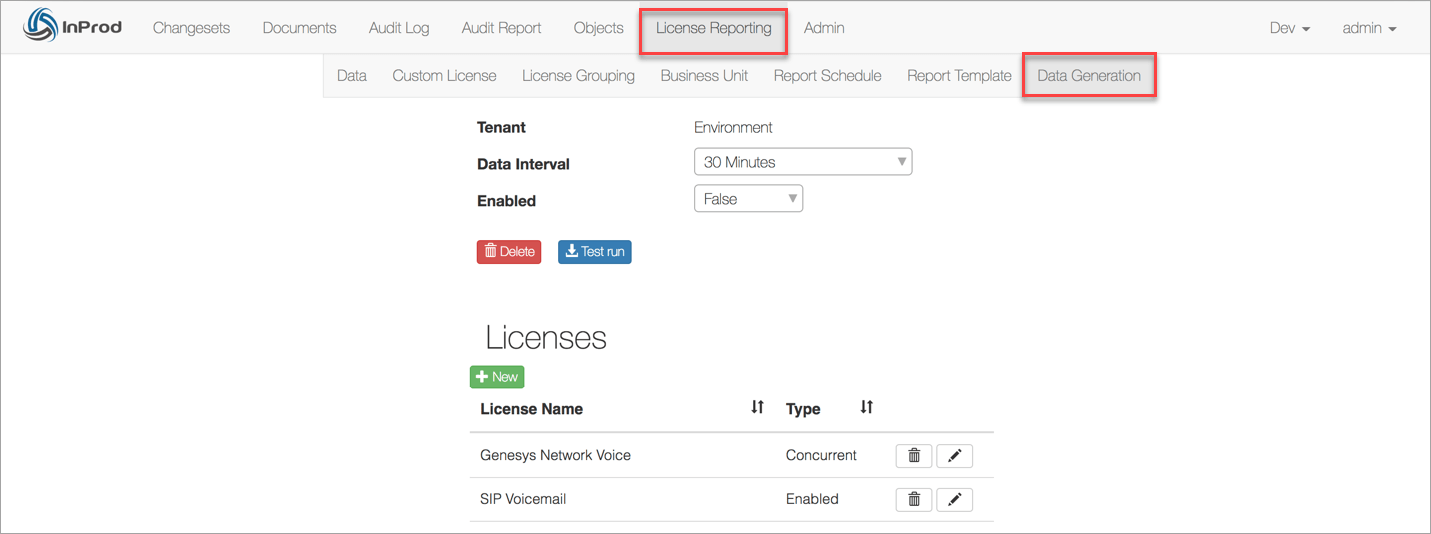
Data Generation Detail page
| Field | Description |
|---|---|
| Data Interval | Defines the interval in which the data will be generated. For example, an interval of 1 hour will generate reporting data on the hour, every hour of every day. |
| Test Run | The button is used for testing and determining if the license data being generated contains all of the desired agents and that the Business Unit configuration is correct. The data generated from the test run is not saved to the database. It is downloaded as an Excel document for review. The Dbid values for all of the resources are included for validation purposes. |
By default, the Data Generation does not process any licenses. The licenses to be calculated must be defined within the Licenses table on this page. This is to prevent the additional process and storage of license types that are undesired.
Within the Licenses table, the license consumption type is defined as being either Enabled or Concurrent. A license can only support one consumption type.
When modifying the license type, you must be careful in considering the historical data.
¶ License Reporting Schema
In InProd, you can directly access the database tables that contain the license reporting usage data. However, you must configure the PostgreSQL database to accept the external connection. By default, the external connections are disabled.
Each entry in the table is either for a system defined Genesys license or a user defined Custom license.
In the tables list, the table bison_gentenant and bison_environment have been truncated to contain only the relevant fields.
| Field | Type | Description |
|---|---|---|
| id | integer | PK ID. |
| tenant_dbid | integer | Tenant Db id. |
| start_time | timestamp | The timestamp for when the data collection process started. |
| license | character varying(100) | Base Genesys licenses that are internally defined. |
| usage | integer | Usage count for the license. |
| enabled | boolean | The value indicating whether the license is reported as ‘Enabled‘ or ‘Disabled‘ for usage. |
| custom_license_id | integer | PK Id for custom license definition, if relevant. |
| env_id | integer | PK Id for the environment. |
| grouping_id | integer | PK Id for Business Unit definition, if relevant. |
public.license_reporting_aggregatedusagedata
| Field | Type | Description |
|---|---|---|
| id | integer | PK Id |
| name | character varying(30) | Object name |
| Description | character varying(150) | Description of the object |
| tenant_dbid | integer | Tenant Database Id. |
| env_id | integer | PK Id for the environment |
public.license_reporting_customlicense
| Field | Type | Description |
| id | integer | PK Id |
| name | character varying(30) | Object name |
| Description | character varying(150) | Description of the object |
| tenant_dbid | integer | Tenant Database Id. |
| env_id | integer | PK Id for the environment |
public.license_reporting_licensegrouping
| Field | Type | Description |
|---|---|---|
| id | integer | PK Id |
| name | character varying(30) | Object name |
| dbid | integer | Database Id for this object |
| env_id | integer | PK Id for the environment |
public.bison_gentenant
| Field | Type | Description |
|---|---|---|
| id | integer | PK Id |
| name | character varying(255) | Object name |
public.bison_environment